Album Art is Hell

(Warning: Semi-stream-of-conciousness rambling follows, I didn’t really edit for clarity.  Sorry.)

Pain is the best educator.

For example:

We keep all of our music organized with Windows Media Player.  It’s not the best thing out there, but it was the first widely available PC music app that actually knew how to handle kanji, so I’ve stuck with it.

There was a brief flirtation with iTunes shortly after we bought our first mac, but that ended in disaster.  It seems that the PC’s encoding of Japanese characters is different from the way the mac encodes Japanese characters, and even though iTunes will read the PC format just fine, when it goes to write out new ID3 tags, it writes them in mac format and a PC running Windows Media Player has no way to handle it.  Cue: Restoring the last backup and re-ripping a couple dozen CDs that hadn’t been in the last backup.

Anyway, back to Media Player.

I’d wondered what was up with album art for some while now.  I’ve never really understood where it’s stored and how applications choose to display it. It hasn’t been a big concern because, well, my MP3 player is 6 years old, doesn’t actually display album art, and simply refuses to die so I have no excuse to buy a new one… but my wife’s MP3 player displays album art, and my PSP displays album art as well, and eventually I’ll probably get a new MP3 player and so on and so forth.

Also I haven’t really delved in to it because, while Media Player actually does get album art for, mmm, about 40% of the CDs I buy, the other 60% are weird stuff that, well, usually I get track names if I’m lucky.

However, after moving all the media to a single server and letting WMP scan it and build up a new library, it did seem like I had an awful lot of art and that, while I did have a lot of albums with no art, I could probably fill in the blanks without too much trouble and it would look ever so much prettier.

Then came pain, and now I have learned much.

For example: When Media Player goes and gets album art for a disc, it stores it in a file called “folder.jpg”, but doesn’t write it into the ID3 tags for the album files.  If you PASTE album art into an album, it actually writes it into the ID3 tag for the files, and then creates a new folder.jpg.  It uses the folder.jpg as the image for any albums in the directory that don’t have embedded art.

So, for example, since I had a bunch of miscellaneous game music tracks in a folder that didn’t have embedded art, whenever I found art for one of them and pasted it, it made a new folder.jpg and all the other tracks in the folder had their artwork (as displayed in WMP) change to the same art.

I’m also pretty sure that, when you’re syncing to a portable mp3 player, it uses folder.jpg and doesn’t use the embedded art, so having multiple albums in one folder is really bad in that case.  It’s OK on the PSP because the PSP ignores folder.jpg and only displays embedded art, which actually has the effect that all the albums WMP knew about are artless on a PSP, whereas the albums I had to go out and find art for manually display art on the PSP just fine.

It’s all rather confusing.

Oh, also WMP shrinks any art you paste in to an album to 200×200, so going out and looking for nice high quality scans isn’t really necessary.

I just wish that nice high quality scans were even an option for some of the discs I have.  I have far too many 15-20 year old anime soundtrack CDs, and I’m having to scour the depths of the Japanese amazon marketplace and yahoo auctions just to find cover scans.

And yes.  I could hook up the scanner and make my own, but that involves scanning and cropping and a whole lot of actual, how you say, work.
Posted in organization | Leave a comment

Aliens, Religious Cults, and me.

In amongst all the tinkering with hardware and network setups, I managed to take a couple of hours to finish Dead Space, which I wholeheartedly recommend.   It has a pretty decent story, albeit heavily cribbed from “Aliens” with a dash of M. Night Shyamalan, the zero-G bits mess with your head just as well as Portal or Prey, the combat is deeply satisfying – even if it’s more than a little disturbing to find that you’re really enjoying lopping off limbs – and it made me jump right out of my skin at least once per level.  It had a couple of down moments, but they really only highlight what they got right, which is most of the game.

I strongly advise playing it late at night, with the lights off and wearing headphones.  I made the mistake of playing through one level in the middle of the day and it sort of hurt the effect.  It was the only time I finished a level and felt like I could jump right in to the next level, as opposed to needing to save the game and step away. 🙂

Posted in videogames, Xbox 360 | Leave a comment

Eggs, One Basket, check.

A final tally on the new year’s project:

Mac mini upgraded & XBMC installed.  Old Mac mini hard drive turned into a 100GB portable drive by adding a $20 SATA-to-USB adapter / case.

Desktop repurposed as a server with a new 1TB drive and Windows Server 2008.

All media – videos, music, photos, books, comics, etc – copied to the new server, with about 300GB left for expansion.

This creates a single point of failure, which gives me the screaming heebie-jeebies, so I’m also running a backup RIGHT NOW to an external 1TB drive.  It’s taken about six hours so far and will probably be done in another two.

Network access rights set up. Everyone on the network has read-only access to the media folders.  The music folder is writable from my user account so I can rip CDs to it, but adding video / etc has to be done from the server console.

The old NAS is in the process of being repurposed as a data volume and I’ll be setting up automated backups of our desktops to it.

My desktop moved from XP Pro to Vista Pro.  This is the first time in quite a while that I’m starting over from a fresh Windows install, so instead of just going through and installing everything I THINK I’ll need, I’m installing software AS I need it and keeping a log of what I install as I do so.  It’s an interesting experiment.

All in all, a very productive time.

Posted in organization | Leave a comment

Mac Media Madness

Some updates on this weekend’s insanity.

The Mac seems to be buzzing along with its new memory and HD.  Leopard is up and running.  The new Front Row is really bleh compared to the version from Tiger, and it had a bitch of a time finding my SMB-based servers, but those are my only complaints as far as system software goes.

In the past, I’ve kept our music on an NAS, photos on my local PC, and our video files on an external USB drive hooked up to the Mini, which wasn’t the best way to do things.  Now they’re all on the server, which makes them a little more accessible but brings its own set of problems – specifically, streaming video across the wireless network to the Mini wasn’t working very well.

I’ve been used, in the past, to using Perian with Front Row, and I planned to continue with that, but it just wasn’t behaving very well.  Specifically, MKV playback was really jumpy, and even plain old divx-encoded avi files were dropping lots of frames.  VLC and MPlayerOSX weren’t much better.

I finally remembered that I’d seen a lifehacker article about XBMC for Mac, so I figured I’d give that a try.  It took a little tweaking – “out of the box”, the apple remote doesn’t work with it quite the way I expected, and it was rather a pain getting Japanese characters to display correctly, but now that it’s all up and running I’m quite a fan.  It’s not ideal – our iTMS purchased content is still in Front Row, while everything else is in XBMC, but it will do for now.

Next I’m considering moving my desktop to Vista Professional.

Pray for me. 🙂

Posted in mac, organization | 1 Comment

Mac Mangling Madness

My wife says to me, after reading that last post, “Why is it, every time you want to work on a Mac, it involves a trip to the hardware store?”

She’s referring, of course, to the fun and games I had getting into an all-in-one Macintosh – specifically, a Macintosh 128, the very first “Mac” – some years ago.  It involved buying torx drivers and hacksawing off most of the handle part so the driver part could actually reach the deeply recessed torx screws, then using something to pop open the case.

They used to make special tools for working on the all-in-one Macs, called “case crackers” – they look like a crowbar with a 90 degree bend near the end.  They don’t look like anything you’d use to work on expensive electronics, more like something you’d use to work OVER expensive electronics.  They have been obsolete for at least 15 years now, but I’m sure that there’s a few long-time Mac owners who keep one in the tool chest just in case…  I never owned one, I mostly did what I could with really wide-bladed screwdrivers.

The Mac Mini, while not exactly EASY to get in to, is not in the same class.  It took a few minutes of fussing at it with a putty knife and occasionally scowling – on the principle that electronics recognize threatening looks, I guess – but it opened.

Then I got to experience the joys of working inside a mini, which were few in number.  I did not expect how tiny all the screws and connectors were going to be, or how fragile the drive cable was going to look.  It was a bit nerve-wracking.

It booted afterwards, though, and it’s running through the Leopard install now.  I can’t yet see whether the full 2GB of RAM is being recognized, but at least the drive seems to be working.

Oh, and I’m really glad I had a spare USB keyboard and mouse sitting around, because my super-fancy Apple-branded bluetooth keyboard and mouse are kinda useless for doing an OS install on a completely bare Mac.

Edit: Actually, OSX is a little too smart for its own good.

See, my “spare USB keyboard” came with an import copy of “The Typing of the Dead: Zombie Panic”, so it has a Japanese key layout.

After the first reboot, OSX correctly detected that the USB keyboard I was using wasn’t a US model and happily offered to default to Japanese keyboard layouts from then on.

That could have been bad. 🙂  I’m not a big enough geek to use a Japanese keyboard on a daily basis.

Posted in mac | 2 Comments

Evil Plans Continue

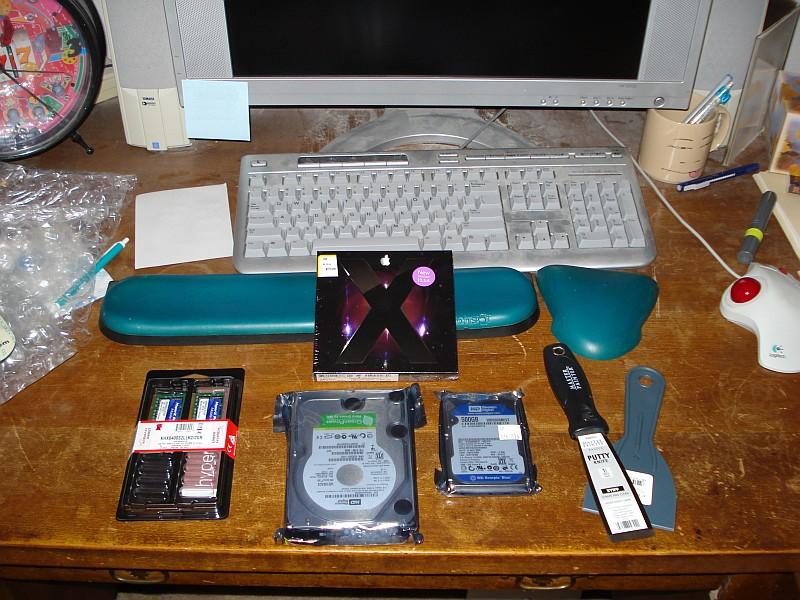
My UPS package came, which, along with a trip to the campus bookstore and to True Value, gave me all the ammunition I need to, well, make a tonne of work for myself this weekend.

PS: I might actually dust, now that I actually look at the state of this desk.  wow.

evilplans

For our Mac Mini:

(2) 1GB SO-DIMMs to bump it from 1GB to 2GB.

(1) 500GB 2.5″ HD to replace the current 100GB drive.

(1) Copy of Leopard, upgrading from 10.4.11

(2) Different putty knives, for to break into with.

For my wife’s gaming PC our new server:

(1) 1TB SATA drive.

Up next: Tales of mighty triumphs and crushing failures.

Posted in mac, organization | Leave a comment

Evil Plans, Go!

I have the next five days off work.

Now that I’ve finished the video capture / encode / edit project, I have one more Big Goal, which is to say: Get our digital crap sorted out.

Stage 1: Taking my wife’s old desktop, that she doesn’t use much since she got her laptop, and making it into a server.  Sadly, the two weeks of godawful snow we had in Oregon have delayed the 1TB drive I ordered for this purpose, but I’m hoping that it arrives tomorrow.

Step 1 of stage 1: Using GPartEd to carve a 30GB chunk out of the 225GB drive she has now, hopefully without destroying her machine in the process.  (I should add, step 0 of stage 1 was to back-up her documents first, because I’m no fool)

Step 2 of stage 1: Installing the copy of Windows Server 2008 that Microsoft kindly gave me for being a student.

More steps and stages as they come up.

Posted in organization | Leave a comment

Suck it, Sisyphus

I have ranted before about the problem of having been too much a fanboy back in the analog media days.   That problem, basically, is that I had a massive pile of analog media around taking up space, slowly degrading, and making me keep VHS decks and laserdisc players around.

About four years ago, I started trying to do something about that – buying replacements on DVD where I could, downloading where I couldn’t, and, for the stuff that I had that was too obscure even for that, capturing to MPEG-2 and then converting to divx format.

Most of this was completed by, oh, August of this year.  That is to say, most of it except the stuff that was going to be a pain.

The pain category consisted of about a dozen tapes, quite a few of them six-hour long tapes, of Random Stuff, mostly off-air recordings of MST3K episodes.

All of these needed to be edited, chopped up into episodes, and – and this bit was especially painful – the commercials carefully chopped out.

I finally got down to the task this last weekend.  It took me about 30 minutes per tape to find and mark all the commercials and then about 5 hours per tape to do the encoding to divx format, but it is done.

Now, if I ever get the crazy urge to watch Night of the Blood Beast or Robot Versus the Aztec Mummy, well, I can do it – and, on that day, it will all have been worth it.

Posted in organization | Leave a comment

Stories, Brave:

Back in summer of 2006, when I made my first solo trip to Japan, one of my goals for the trip was to see Ged Senki in a theater – because, damnit, I wanted to see a Studio Ghibli movie as it was meant to be seen.

At the time, there were actually two Big Screen anime movies playing – this is quite rare, really, the theatrical anime industry in Japan is pretty much dead – Ged Senki, which I saw, and Brave Story, which I didn’t.

About a year after my trip, however, the Brave Story PSP game came out, to rave reviews… well, rave reviews from the sorts of people I listen to, anyway… and I bought it, played it, and enjoyed it considerably.

Just this year, the Brave Story movie DVD was priced down to Y1500,  a price which, even with the crappy exchange rate, is quite reasonable, particularly as it has English subtitles.  Not very good subtitles, in places, but subtitles nonetheless.

Now, then, there’s something about Vision, the world in which the Brave Story… Brave Stories? Brave Story Stories? Brave Storyverse? Let’s move on… the world in which the game and movie are both set.

To explain, I need to digress a bit.

From watching anime, it becomes obvious that almost every Japanese child is, at some point in their developmental years, whisked off to an alternate universe or an alien planet or something similar, and while there they have to fulfill a quest, they learn some valuable life lessons, and then they get plunked back into mundanity, only this time Things are Better.  I imagine that office conversations, once they grow up and become salarymen, revolve heavily around all the various office drones recounting the details of Their Particular Adventure, ending in deep sighs as they return to their desks and get back to the annual reports.

The American equivalent would probably be Back to the Future 1 & 2, only with less Michael J. Fox.

Anyway, Vision turns out to be a world that’s gotten kind of used to all these Japanese kids appearing out of nowhere.  They have a pretty good system for dealing with them – process them, assign them a fantasy archetype based on standardized testing, and send them on their way to hopefully get their quest done and get the heck back to Japan before screwing too much up.

The game, “Brave Story: New Traveler”, is, as the name would suggest, a sequel to the events of the original Brave Story, so it has a bunch of kameos that don’t make a whole lot of sense but that don’t change the plot all that much.  It was a Well Done Sequel: you definitely had a feeling that Things Had Happened, but it was its own story.

The movie, “Brave Story”, is an adaptation of a novel, and suffers somewhat from it if you haven’t read the book – I haven’t, by the way.  You get some character introductions, some nice set pieces which hit – presumably – the “high spots” of the novel, a montage about halfway through the film where you see the main characters doing things that probably make a lot more sense if you’ve read the novel, and then you get about an hour of mixed action and dramatic plot development.  Once you get to that part of the movie, it’s pretty satisfactory even without having read the book.

It’s just staying interested until that point that’s a little tricky.

I’m tempted to go hunt down the book – a Rowlingesque 824-page TOME – read it, and then re-watch the movie.  The animation was superb and I think it deserves another go.

Posted in anime | Leave a comment

I’m a bad man.

So, there’s this developer at work who I have kind of a friendly adversarial relationship with.

That is to say, he’s a decent enough guy and we get along well, but he really doesn’t understand what QA’s role is.  He thinks that it’s to test the code as he’s written it, while my outlook is more that I should be testing the code to see whether he’s written it according to the spec.

This means that I tend to file lots of bugs like “per spec section 2.2.8.1, x is incorrect behavior, it should be doing y.”

In return, he’s done things like send bugs back to me marked “won’t fix”, with the Reason field filled out with “pffft.”

Anyway.  We do get along better than this would suggest, because my point of view is that, eventually, the customer will either notice that the product doesn’t work the way they wanted it to, in which case I’ll be able to pull out the bug report and point out that I filed a bug on the issue, or the customer won’t notice, in which case no harm done.

The important thing is that there IS a bug report.

But I have embarked on a program to break him, anyway.

We have heavily-subsidized snacks at work.  Candy bars are a quarter, for instance, and we get free soda.  These are pretty nice perks.

The problem is that, when snacks are so cheap, it takes a little more willpower not to indulge.

Case in point, this particular developer and Peanut M&Ms.

Three or four months ago, I was in his cubicle talking about something, and he picks up the bag of Peanut M&Ms on his desk, shows it to me, and says:

“You see this?  This is my last bag of Peanut M&Ms.  No more.  I am off Peanut M&Ms as of now.”

So of course, for the next month or so, I would drop off another bag of Peanut M&Ms on his desk when he walked away, and he would come back, and he would swear, and then I would hear the bag being ripped open.

Our snack cabinet ran out of Peanut M&Ms eventually, and when it got restocked, they did not restock the Peanut M&Ms.  I believe this to have been at his request.

This evening, at the store, I saw that they had Christmas-themed 2-pound bags of M&M products marked down to a buck-eighty.

Someone’s getting a little present Monday morning.

I’m a bad man.

Posted in work | Leave a comment