Homelab updates: Bazzite is pretty cool!

A few days ago, I mentioned that one of the services I was adding to my home lab was game streaming, with me repurposing a 5700U-based micro PC as a Bazzite box.

Side note: Serious props to the Bazzite team for this video explaining how to install onto a Windows box while maintaining a small Windows partition for dual booting:

I had some trouble resizing the Windows disk, because there were all sorts of immovable files that wanted to prevent me shrinking the main partition, but eventually I got over that hump and managed to get the Windows partition down to 120GB, leaving the rest of a 500GB SSD open for my new Bazzite install.

Anyway.  The 5700U APU doesn’t have a particularly beefy GPU, but it’s plenty for running… well, mostly games from the PS3 / Xbox 360 era.  I played some Bioshock on it, and some Arkham City, and both were flawless.  I then moved to streaming those to another computer and they were STILL flawless.  Bazzite comes with the “Sunlight” half of the “Sunlight/Moonlight” game streaming software installed, and configuring it was like 2 minutes worth of going through menus and then needing to look up the port to get into the Web UI to authorize the Moonlight client running on my Mac.

For the record, it’s https://localhost:47990 – and, yes, the https is significant.  I’m not sure why it mandates an encrypted connection, especially since it uses a self-signed certificate that makes web browsers freak out, but you gotta have the S in there.

With Sunlight in place, I disconnected it from its display and moved it into my closet, adding a simple HDMI dummy plug so it would think it still had a monitor.  This is important, but also became a source of problems.

The first thing I noticed was that, while I had been using an old TV as my test monitor, which had a native resolution of 1366×768, the HDMI dummy plug was detected as a 1920×1080 monitor with a 120hz refresh rate – and this was a problem because the 5700U REALLY can’t run a modern – or even semi-modern – game at 1080p.  Arkham City, for example, was barely able to break 30fps and something like Atelier Ryza was a slide show.

The obvious answer was to configure games to run at 720, sacrificing visual fidelity for performance, but this had its own problem:
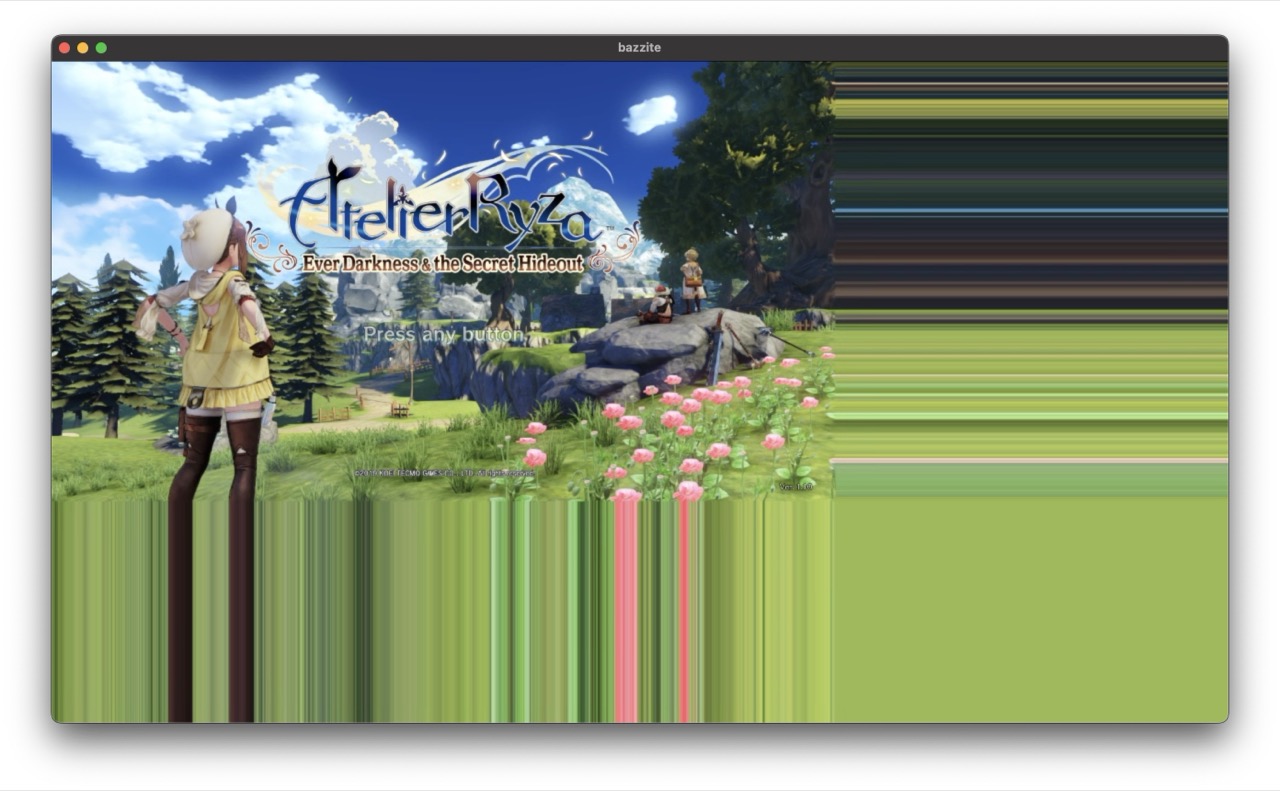
720P Ryza Fullscreen

…games would get shoved up into the top left corner of the screen, with the other three quadrants full of color banding as shown.  Using Steam streaming rather than Moonlight wasn’t AS bad, but the game was still only in one corner of the screen.  The other three quadrants were just black.

Doing some digging into the graphics settings for Ryza gave me a solution, though:
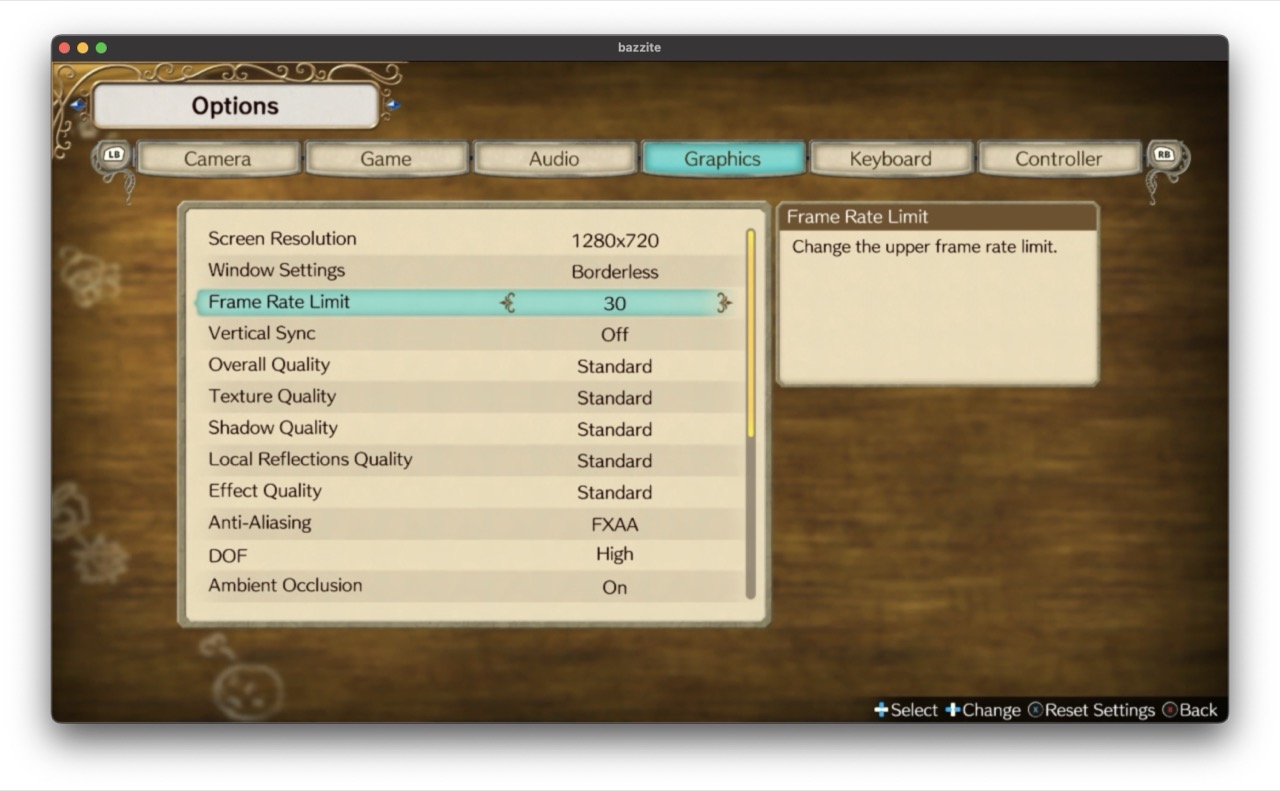
Ryza graphics settings

Configuring the game to run in Borderless mode got me a full-screen 720P image, and we were back on track:
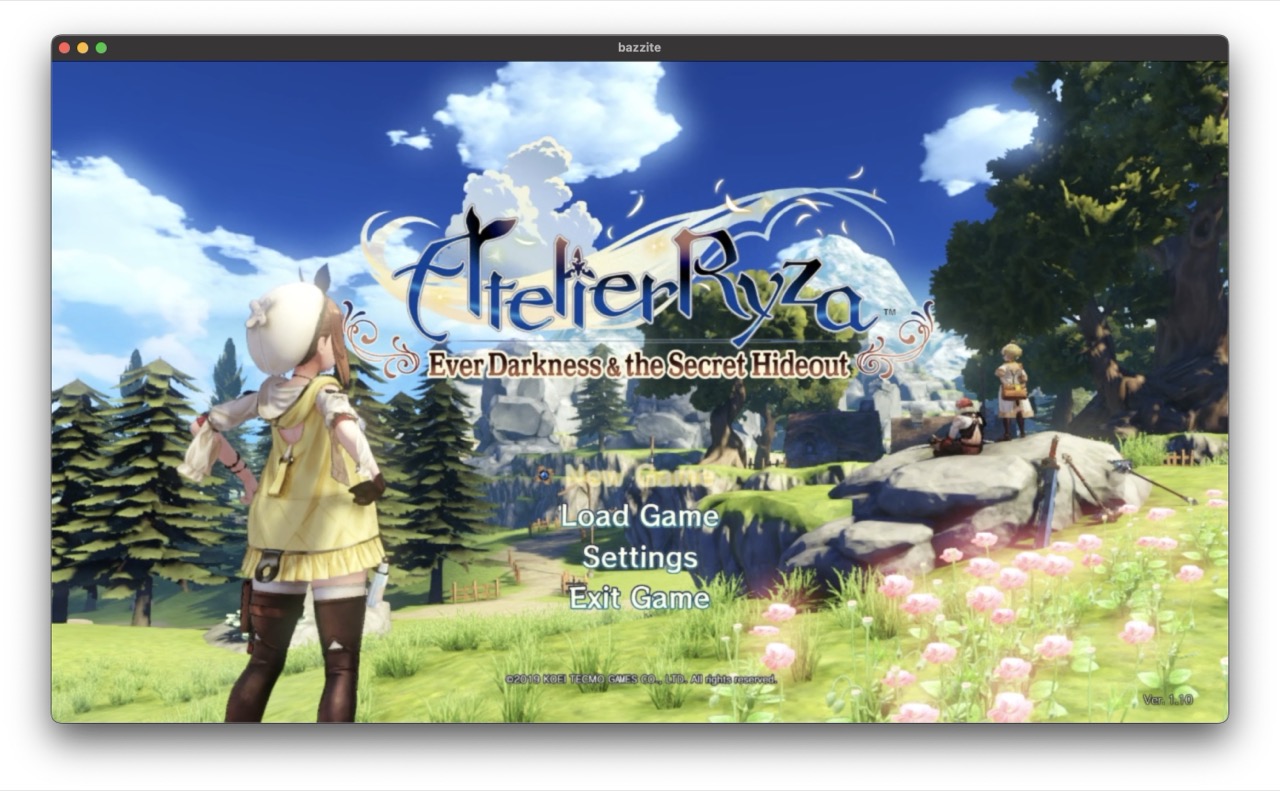
720P Ryza borderless

That was one problem solved, and then I hit the next one:

Shantae is a bit of a troublemaker

I’d used Shantae: 1/2 Genie Hero as one of my test cases for game streaming, because it’s a platform game and I find those to be very unforgiving when it comes to latency.  Believe it or not, I was able to play it just fine over remote play… though admittedly with a wired network.  I wouldn’t try it on wifi.

It even runs smoothly on the little Ryzen 5700U PC at 1080P!  It is not a very demanding game, and it’s one of my favorite platformers.  You do feel very squishy until you buy a few upgrades for your character, but that’s a pretty minor complaint.

It’s also, for some reason, a game where the game speed is tied to the refresh rate of your primary monitor.  Remember when I said that my dummy HDMI plug identified itself as a 1920×1080 monitor with a 120hz refresh rate?  Well, Shantae really wants to run at 60fps and if you give it a 120hz monitor it runs at double speed.

Which is, to put it simply, Hard Mode.

I didn’t realize this was what was happening at first, of course.  No, first I spent several hours troubleshooting the streaming client.  It wasn’t until I found a thread on the GoG forums talking about the issue that I realized that it was a problem with this specific game – and despite my best efforts to tell Bazzite to run at 60hz, the game saw that 120hz monitor and ran with it.

Eventually, the solution was to buy a different dummy monitor dongle, one that advertises itself to the system as a 1080p 60Hz monitor.  Fortunately these things are like five bucks.

Long-term, I plan to move Bazzite to a VM hosted on my Proxmox box, and I’ll give it a real GPU to use at that time.  That should considerably improve the visuals by opening up the option of 1080P gaming.

The only quirk I’m still dealing with is that I can’t open the Steam Overlay while I’m in a game.  Like, if I press the Xbox button on my controller I hear the SOUND of the Steam Overlay opening, and I hear navigation sounds from the Steam Overlay when I move the thumbstick, but I have no idea what I’m highlighting.

Still… progress!  Very solid progress, too.

Posted in homelab, linux gaming, videogames | Leave a comment

I am the alpha nerd

I do not make this claim lightly.

OK, I make it pretty lightly.  “Alpha Nerd” is a pretty high bar to hit, after all, and should really be reserved for people who hand roll binary patches for their custom linux kernels.

But I’m feeling pretty good about today’s project, so I will brag a bit.

I am fortunate enough to be married to a woman with very good taste in media.  She consumes an ungodly amount of manga and light novels from all over Asia, but in particular has been REALLY into Chinese stuff recently.

There’s been just one problem.  While people who translate Japanese content tend to just put it up for download, the culture is completely different when it comes to translations of Chinese content.  It’s much more common to see them published as individual blog posts, and they often disappear from the web.

Naturally, she wanted local copies of her favorites so they couldn’t just poof, and I thought I’d solved this last year when I found a scraper program that would download fan translations as ePubs.

I had not, to be clear, solved it.  There were still a lot of sites that it didn’t address.

She came up with a solution on her own for these – a program called Goodlinks which allows you to archive local copies of web pages.  It’s not very automated, though, and some of these novels are made up of hundreds of individual web pages.  So saving a single novel locally was a process of opening each of these pages, one at a time, and saving them.

A few months ago, my answer would have been “wow, that sounds rough” because I did not have a solution.

Today, I had a solution.

Well, Copilot helped.  Really, it did almost all of the work to start.

The first thing I asked Copilot for was a python script that could be passed a URL and that would return a list of all the links on the referenced page.  This was easy enough, but you couldn’t import it into Goodlinks.  Goodlinks WOULD take a bookmarks.html file, though, so I did some hacking at an exported bookmarks.html file until I figured out what format it wanted its URLs in.

For the record, it wants one link per line in the file – and for some reason, every one of them needs to be prefaced with <DT>

All of this was 100% Copilot, with a little “And could it do this instead?” from my side.

It didn’t take long.  Like, 20-30 minutes from “I can do this better” to “Here’s your completed python script!”

Thing is, though, handing someone a python script is not super helpful.  And my wife doesn’t really like to turn on her computer.  So I needed a solution that could work from a phone.

After considering a few options, I decided that I would set up an email address that would accept emails including a URL in the body of the email, throw that URL at the python script that Copilot had given me, and email the resultant html file back to the email address that the URL had come from.  And, because I enjoy self harm, I decided to do this on one of my Linux VMs.

My first assumption was that it would be easy to have an email client on Linux watch for emails of a specific format and send the emails to an external script for processing.  This turned out to be my first, but not my worst, assumption because… well, I guess if you’re a Linux guy you are expected to use webmail for stuff.  It took me a few clients before I stumbled on to Evolution, which lets you set up an email filter that will pipe the body of the email through an external command.

I was in business!  It turned out that it was actually really easy to take the output from Evolution and send it through a simple shell script to parse out the sender’s email address and the URL from the incoming email, and to put the URL through the Python script I’d generated earlier, and to…

…well, now I had an html file but I needed to mail it back.

I had THOUGHT that you could do this from Thunderbird, and it turns out that you can!

Almost.

Kinda.

Sorta.

Well.

…from a command line, you can tell Thunderbird to generate an email, and it will populate an email message, and then it will sit there and wait for you to manually click the Send button.  It won’t go that last step.  There are workarounds, of course, but they involve using desktop control software to simulate a mouse click on the pixel on the screen that should be over the Send button.

OK.  So how do I send an email from the command line?

Some googling led me to a program called sSMTP, and then I spent probably two hours just trying to get it to authenticate to a gmail account.  gmail has some pretty strong authentication requirements, though, and I could not figure out how to jump through all of the required hoops.

Thankfully, The ISP Formerly Known As Comcast isn’t quite as picky.  You need to go into your email settings and tell it to accept email from third party applications, but once you’ve done that you can use any email client.

Despite being able to authenticate, though, I still couldn’t get it to send an email.  This may be because, unbeknownst to me, I at some point managed to get my email flagged for spam by iCloud and so all of my test emails were being dumped into the ether.  It may also have been because sSMTP was deprecated!  We’ll never know which it was, because I eventually moved to a mail program named msmtp which is apparently the replacement for sSMTP.  That was the first point where I could actually send emails to myself from the command line, and where I thought I had really turned a corner…

…except I couldn’t attach a file.

Some further research, and I found that I would need to install an email client that understood how to MIME-encode an email and attach a file to it, and there’s one called “mutt” that will do this and will even use msmtp as the program to do the mail sending thing so all of the work it took me to get msmtp configured wouldn’t be wasted.

And I got that configured.  And I tried my script again.

And finally, after about six hours of staring at terminal windows and willing them to work, I got to a point where I could send myself an email, with a URL in the email, and Evolution would receive the email and send it off to my python script for parsing, and the script would download the referenced web page and make a bookmarks.html file out of it, and pass that to mutt, and mutt would bundle it up and send it to msmtp for mailing, and the bookmarks.html file would land in my inbox and could be easily imported into Goodlinks.

I mean, really it is just so obvious! I don’t know what took me so long.

I kinda don’t know whether I should actually brag about this or not.  I am fully prepared for someone to stumble across this and point me at a one-click solution for the whole dang thing.  Please be gentle if that someone is you.


For later reference, here are some of the sites I found to help me get through this whole nightmare:

https://arnaudr.io/2020/08/24/send-emails-from-your-terminal-with-msmtp/

https://linsnotes.com/posts/sending-email-from-raspberry-pi-using-msmtp-and-mutt/

https://hostpresto.com/tutorials/how-to-send-email-from-the-command-line-with-msmtp-and-mutt/

https://www.baeldung.com/linux/send-emails-from-terminal


Posted in homelab, shell scripts | Leave a comment

Prepping for the next homelab project

So, my homelab experiment is running generally quite well.  I keep running into an annoying Proxmox bug that makes the ethernet controller hang up, and hopefully they will fix that soon, but I have a lot of self-hosted services now.  File sharing, media sharing, comics and manga servers, so on and so forth.

Naturally I can’t stop there.

Neither my wife nor I are what you’d call vehemently anti-Windows, but we’ve both been a little annoyed by the direction Windows 11 has been going.  Not the operating system itself – that’s fine – but I’m pretty tired of the constant notifications and hints to install “suggested applications” and in general it feels less like a desktop OS and more like a cheap carrier-subsidized smartphone.

And, to be clear, I’m running Windows 11 Professional.  Not home.  I should not be getting a “hey did you want to install Telegram?” in my start menu.

So, that was one big reason we replaced her desktop PC with an M4 Pro Mac Mini – and it’s been working out very well for her!  But she’d still like access to some of her games that don’t have Mac versions.

Hence, I am delving into the Linux dark arts.

A little while ago, I bought an Ayaneo AM-01 “Retro Mini PC” which is basically just an AMD APU in a box that is heavily reminiscent of a classic Macintosh.  I did this based solely on how it looked, with no real idea what I was going to use the thing for, and thus far I have not been able to justify its existence.

Thankfully, it’s perfect for this project.  My goal is to install Bazzite on it, set it up with Steam remote play, and have it as a network-accessible game streaming device.  It’s only a 5700U so heavy duty gaming is right out – but lightweight stuff will be fine.

Assuming it works – and my guess is that it will, Bazzite has a reputation for being solid and Proton is very mature these days – the step after THAT is to slap a GPU into my Proxmox server and pass it through to a virtual Bazzite box.  Which will mean that the Ayaneo box will again be left without anything to do but also that any system in the house can just boot up Steam and run games from it.

In theory.  Lotta “in theory” in this plan.

Updates as I have them.


Posted in homelab, linux gaming, videogames | Leave a comment

More home server stuff. Reading is FUNdamental!

It’s been a good week for projects.  Maybe a good couple of weeks, actually – I kinda forgot when I started working on this particular one.

I mentioned last month that I’d set up a home server for the purpose of actually learning new things, and that’s been working pretty well.  It did eventually get moved from the card table into the server closet, though there was a bit of a misunderstanding on my part when it came to the question of whether or not it would fit in my rack.  I thought it would, but physics disagreed and physics always gets the final word in this house.

Oh man.  Now I want a rainbow yard sign that starts with “in this house, we follow the laws of thermodynamics” and just goes from there.

It can go next to our Litany Against Fear sign.

(Note: We do not actually have this sign.  I live in the Pacific Northwest and our neighbors have no sense of humor.)

But, I digress.

At any rate, this most recent project has been setting up a self-hosted server to host our collection of comic books, manga, and assorted eBooks, and I’ve discovered that there is no such thing as one server that does everything.

I mean, first things first – we have a couple thousand books purchased through the Kindle and Apple Books stores.  There’s no real way to integrate those into anything self-hosted.  But we also have a lot of stuff that has been just kind of accumulated, whether that’s ePub format comics from Humble Bundles or PDFs from DriveThruComics or, let’s be honest, a WHOLE lot of pirated comic books that were mostly accumulated long enough ago that Demonoid was still under its original management.

Side note: Those books have been the reason I’ve been doing a lot of shell scripting recently, and abusing the heck out of generative AI.   There were about 30,000 files and many of them were duplicates and there was no standard for naming and some were rar files and some zips and it was a big old mess.  I’ve deleted about 10,000 and normalized about another 13,000 but I have a long way to go.  Being able to ask Copilot for a script that, say, descends into a directory tree and removes all instances of # from file names and pads all numbers to three digits with leading 0s has been a huge help.

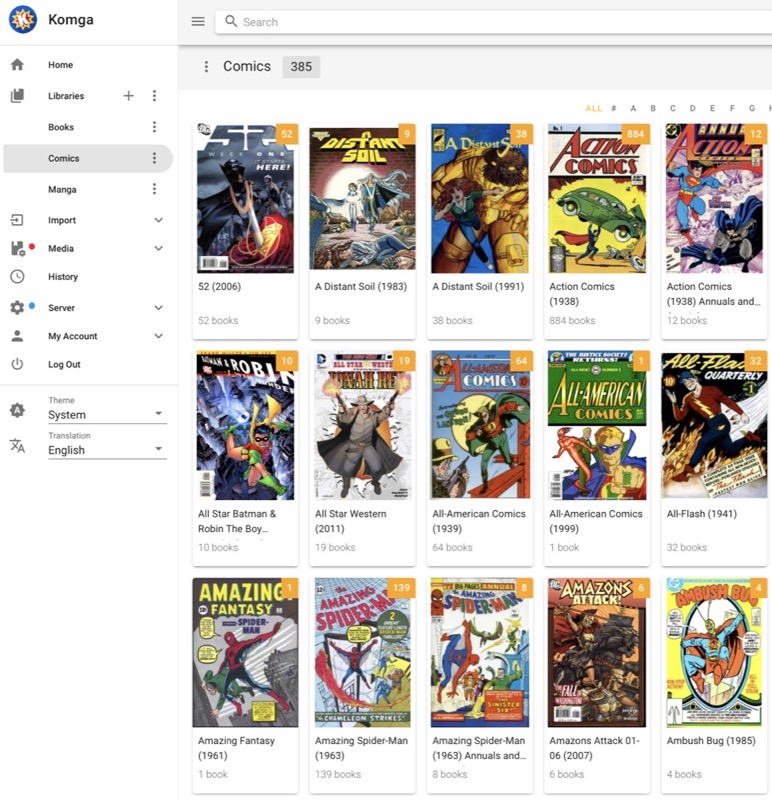
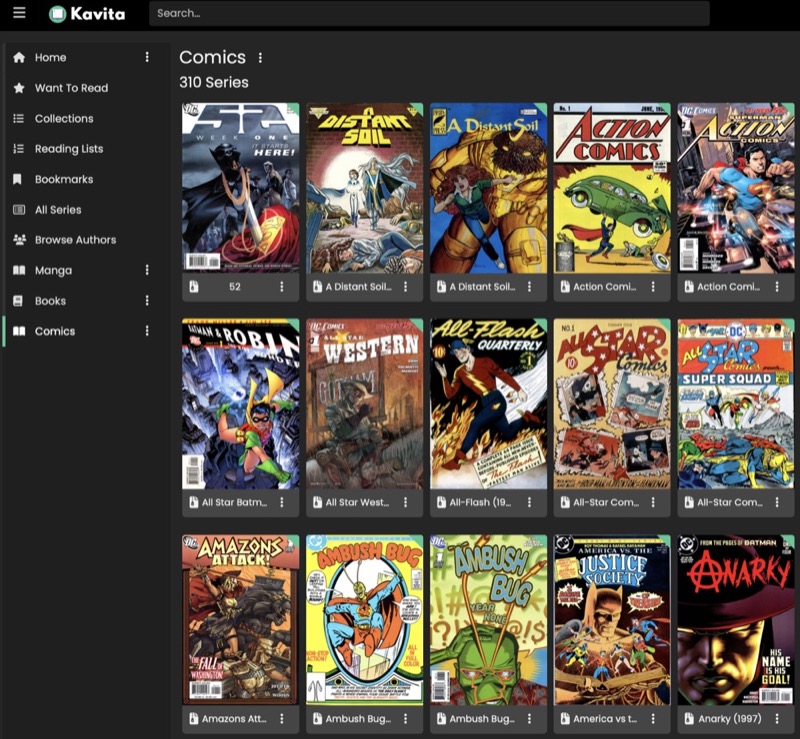
Anyway, I’ve been experimenting with three different self-hosting solutions: Komga, Kavita and Suwayomi.

Komga

First, Komga.  Amazing for comics and manga – it handles the 2-page spreads in ePub files from Humble Bundle, which neither of the other two does well with.  It also doesn’t much care what format things are in and doesn’t have any particular mandates as far as naming conventions are concerned.  While I am still putting a considerable amount of time into normalizing filenames, if I just wanted to point a server at a bunch of unsorted folders to give me access to them via an internet browser, this would win.

I haven’t messed around with its metadata features at all.

Biggest downside:  Importing new media is SLOW.  Like, I assume it is doing some serious processing of each file but it seems to take an inordinate amount of time to do so.

Kavita

Next, Kavita.  I actually like Kavita a lot, but it falls down with the 2-page spreads in Humble Bundle ePubs and is very picky about how it wants its content organized on the disk.  It’s much faster than Komga when importing new content but that isn’t something you do much after you have your library set up.

It is, however, the absolute best for reading ePubs with words in them, as it has a ton of font size and line spacing options.

Suwayomi

Finally, Suwayomi.  Suwayomi is a single purpose app – it does manga, and that’s it.  This is a weird one, because it really doesn’t want to work with local copies of manga and doesn’t like stuff organized by volume rather than chapter.  It wants to read stuff off web sites, with optional downloads, and anything it does beyond that falls into “happy accidents”.

Really, it’s a piracy app that also works as a dang good aggregator for reading questionable manga translations.  My wife has absolutely taken to it, so big props to the Suwayomi team for making something that justifies all of my work.

If I could have one wishlist item for Suwayomi, it would be multi-user support.  We have pretty different tastes in manga and don’t really want to see each others’ manga libraries.  Fortunately, since I’m running it in an Unraid Docker container, it took basically no work to spin up a second instance of Suwayomi and now we have separate libraries based on the port number you connect to.

It ALSO made me figure out Tailscale so she can read manga while she’s on the go.  So that was a huge win!  I’m still kinda uncomfortable with allowing external access to our network, but Tailscale is big enough and reputedly secure enough that I figure I can trust them.

So, which one will I be going with?  Well, that’s the neat thing.  I can’t pick.  None of them do EVERYTHING I want, but each of them has one thing they are just really amazingly good at.

So, in the end… I’m running all three.  Thank God for Docker.

Once I get all of the media actually sorted out, I may want to look into some sort of tablet app for these, for offline reading.  That will probably be its own sort of fun.


Posted in comics, homelab, organization | Leave a comment

At this rate, I should be ready for Switch 2 around 2029.

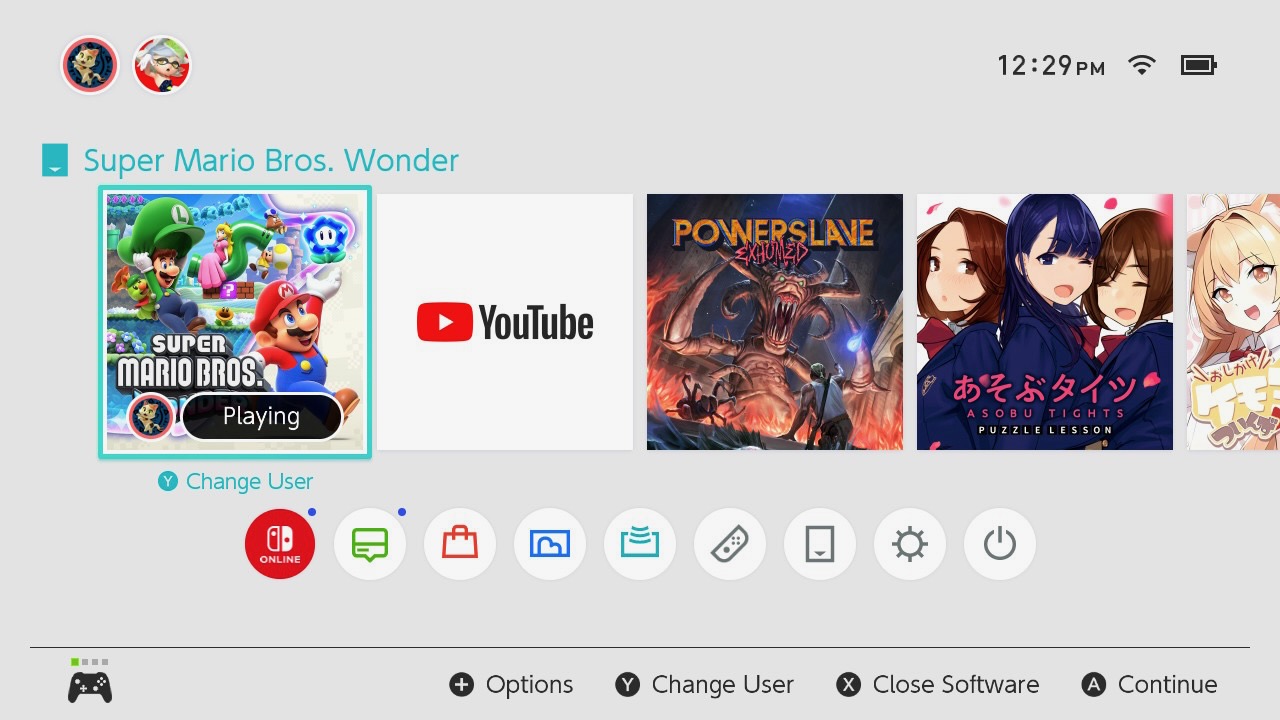
So, playing through Assassin’s Creed: Mirage has not yet inspired me to dive full-heartedly into the terrifying morass of games I have built up over the years, but it did at least get me to look at my shelf of red-spined Switch cases and pull something down.

For me, playing an October 2023 release in May of ’25 is practically like playing it on release date.   I actually have a little more shame than usual that it’s taken me this long to get around to it, because I not only bought it on day one, I bought it on day one IN JAPAN because, gosh darn it, I wanted to buy a major video game release on its launch date there at least once in my life.  Bic Camera even threw in a clear file and some stickers as a bonus.

It didn’t hurt that the exchange rate meant that it was, like, $42 instead of $60.  Or is it $70 now?  I don’t know what Switch games cost.

I’m not super far into the game, but it’s definitely hitting all the right notes.  It’s super colorful, cheerful to a fault, and finally fixed the one thing I most dislike about Mario games:

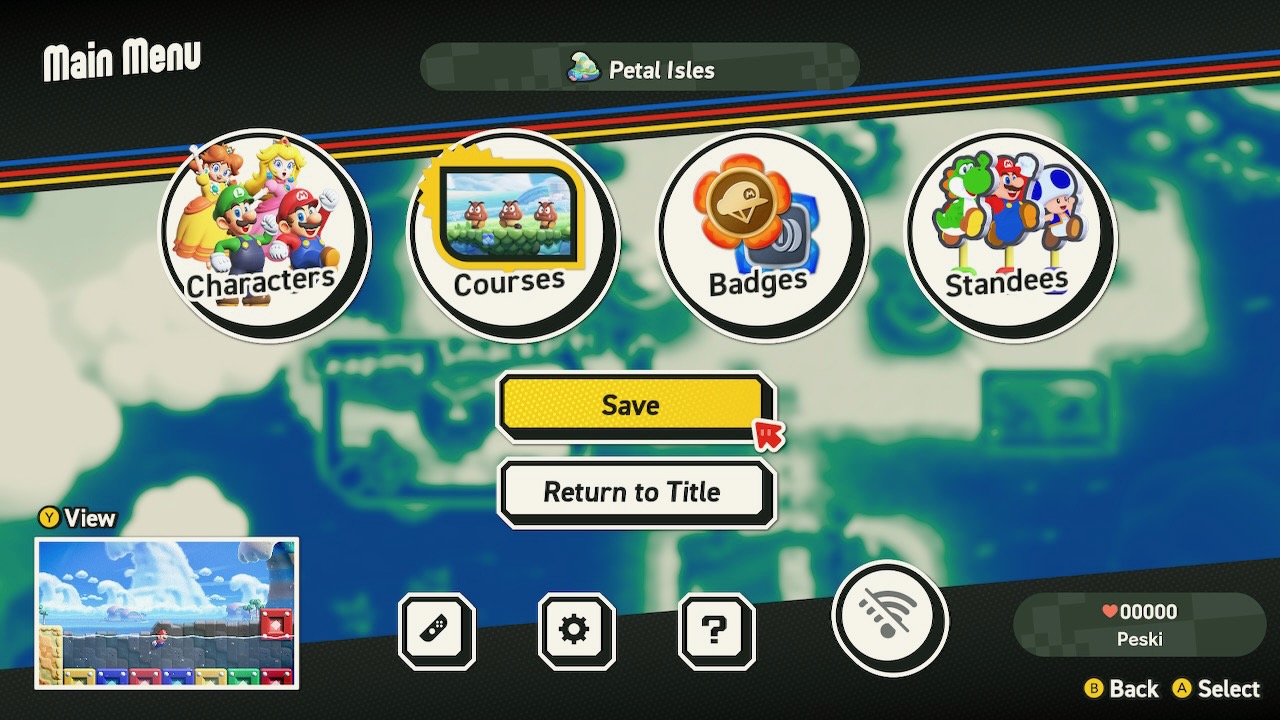
You can save the game whenever you want.  You don’t need to play a certain number of levels to earn a save, or get to a Toad house that lets you save once, or any other nonsense.  Open menu, press save, done.

Sadly, it still has a “lives” system, which is a pet peeve of mine.  I am in my 50s, I do not have particularly impressive reflexes, I was never very good at platforming games even when I was considerably younger, and I go through a LOT of lives once the difficulty goes up a little bit.  Most of the time, when I get into a Mario game, there’s a point where I have to go back to an easy level with a few one-ups or a lot of coins and just grind the heck out of it.

SMB: Wonder isn’t there yet!  It’s actually been pretty mellow so far, and I’ve managed to accumulate a nice stash of lives.  I’m only on the second world, though.  Hopefully I find that super easy 1up grinding level before things heat up too much.

Rant aside, I’m having a blast in general.  I’m even finding myself playing levels two or more times so I can see them in “regular” mode in addition to the absolute madness that starts once you pick up a Wonder flower thing.

So, definitely a good one to pull off the shelf.   The only real problem is the number of games still up there that have never even been booted once.  I’ll get to them.  Eventually.  Probably before I buy the next system and put even MORE red spines on the shelf.

Wait, what color are Switch 2 boxes?  If they’re like blue, or something, that’s going to be weird.

Posted in Switch | Leave a comment

Well, I had a pretty good run. All hail our machine overlords.

It’s been a few years since I’ve seen one in the wild, but I’ve known a few IT guys who liked to rock a shirt with some variant of “Be nice to me or I will replace you with a shell script” emblazoned across the chest.

Here’s an example, stolen from Amazon:

Now, I’ve always felt that this was a little misanthropic, though that’s certainly nothing new when it comes to the particular line of work I’m in.  Being in IT / computer security / development / nerd stuff in general, we tend to get a bit of a sense that our contributions are not properly appreciated and rewarded, and that lends itself naturally to fostering a bit of bitterness.

And, occasionally, this sort of mentality is very accurate.  In my last position, I needed to get data from a spreadsheet that was supposed to update on Mondays, but that would occasionally update later in the week for no apparent reason.  Sometimes, it would even skip a week.  I eventually got annoyed enough by this to dig into it, and it came out that the spreadsheet needed input from a different system and that the process for getting data from that system into the spreadsheet was that a particular employee needed to hand-copy the values from system A into spreadsheet B, and they were the only employee with access to both, so if they were out of the office it didn’t get done.

That could absolutely have been scripted.

Now, I’ve never owned a shirt like this, and I don’t do a ton of scripting.  But I do some!  Occasionally I put up a post on this site talking about some new challenge I have faced and solved, generally with a lot of reading Stack Overflow and parsing through man pages.  It makes me feel very satisfied.

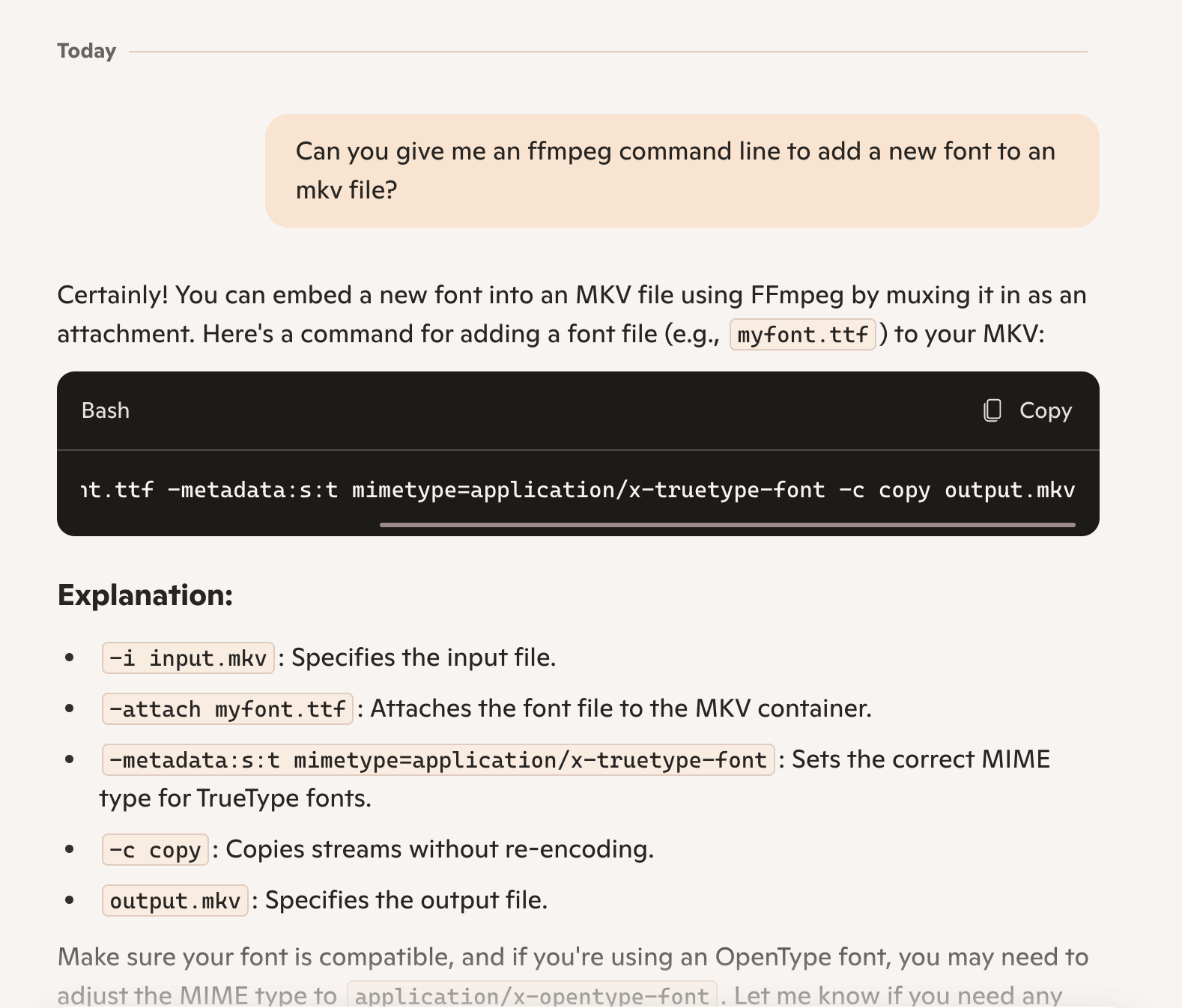
The post I put up just the other day, for instance, with me talking about how I had figured out how to use ffmpeg to add a new font to an mkv file?  Peak satisfaction.

…and then I made the mistake of getting curious.

I’ve used Microsoft’s Copilot to help debug scripts in the past.  How would it perform with something like ffmpeg?  Surely that software, while very useful in a specific domain, would also be fairly obscure?

…oh dear.  That would have saved me a lot of time.

So I was a little shaken, and then I made the mistake of asking for Copilot’s help with something else.  See, I have about 30,000 downloaded comic books in .cbz format, and they are not named in any particularly-consistent way.  I’ve been kind of mentally playing around with a script to normalize the filenames, but have hit so many edge cases and little frustrations that it’s never gotten off the ground.  I’ve probably devoted 3 or 4 hours to this, without a single line of usable code emerging from the thought process.

It did take me a few attempts before I managed to describe exactly what I wanted to Copilot’s satisfaction, but that was a few minutes, at most 10, and what came out of it was a working and (and this is even more vexing) COMMENTED shell script that did precisely what I wanted.

So, yeah.  I’m still clinging to a tiny shred of self-worth, because I did need to describe what I wanted, and being able to describe a problem well is probably a skill of its own, but boy did I get taken down a few pegs.


Posted in shell scripts | Leave a comment

A quick script to add a font to an MKV file

Why do I do this to myself?

OK, so.  Some background.

I’ve been working on a Jellyfin server as something of a side project, with the idea that it will probably teach me something useful that I can apply at some later point in time.  I don’t NEED a Jellyfin server, since I usually serve all my content through iTunes, but I can’t deny that it is very handy to be able to just download an MKV file with embedded subtitles and play it without first running the files through handbrake to burn the subs into the video.

Also, files with non-burned subtitles mean that I can do stuff like fix typos in the subtitle script, mostly the ever-painful “YOUR WELCOME”, which I see as a sign that the person proofing the subtitles dropped out of school before hitting, roughly, third grade.

I make this sort of snide holier-than-thou comment despite being fully aware that my personal use (more properly, misuse) of, specifically, commas and (to a lesser extent) apostrophes is egregious enough to be considered a war crime in several of the more refined countries.  And also Angola, for some reason.

Note: I’m not sure Angola is a country, but I’m too lazy to google it and for the sake of the joke let’s just roll with it.  OK?

But I digress.

Moving on to the topic of today’s post, I have been downloading a bunch of anime to serve as content for the Jellyfin server – and one of the shows I downloaded was season 1 of The Apothecary Diaries.  I am not enough of a weeb to call it “Kusuriya no Hitorigoto”, but you can think of it thusly if you prefer.

You can also call it The Maomao Is Just The Best Girl In The World Show, which is also fine!  Honestly it would have been a better translation.

However, after downloading a batch of episodes, I noticed a couple of notes on the torrent:

I’m not certain that I would have noticed the missing fonts, personally – but since someone had been gracious enough to point out the errors AND provide links to download the fonts, I decided that I would correct the issues with the mkv files before copying them up to the Jellyfin server for future watching.

Naturally, this led me, as always, to ffmpeg, a lovely all-purpose Cultural Cat Girl tool for manipulating video files.

It also led me, after a couple of false starts on my own, to this superuser.com thread which explained some of the errors I was getting and gave me enough information to write a script to, well, attach fonts to mkv files.

The script is as follows, though I will caution you that it is not really the best thing in the world.  For one thing, it doesn’t check whether the font file actually exists!  It also doesn’t check that it IS a font file, and the mime type it assigns to the font file is always font/otf and never application/x-truetype-font even if that would be more appropriate.  I am relying on the video player to make the right call here.

Furthermore, I didn’t test it very thoroughly at all.  I ran it against a single file, and then a folder full of files, and tested the delete option, and these all seemed to work well enough for me.

#!/bin/bash
#
# add_font_to_mkv - adds a font as an attachment to an MKV file (Creates a new mkv file with .font_added.mkv extension)
# Usage: add_font_to_mkv all FONT_FILE - adds font to all mkv files in the folder
# add_font_to_mkv filename FONT_FILE - adds font to specified file
# add_font_to_mkv (filename or all) FONT_FILE delete - delete originals after update
#

if [ "$1" = "all" ];
then
echo "Batch Conversion"
for filename in [ *.mkv ]
do
filenamenoext=${filename%.*}
if [ -f "$filenamenoext".mkv ];
then
ffmpeg -i "$filenamenoext".mkv -map 0 -c copy -attach "$2" -metadata:s:t mimetype=font/otf "$filenamenoext".font_added.mkv
if [ "$3" = "delete" ];
then
rm "$filenamenoext".mkv
fi
fi


done
else
echo "Single File Conversion"

filename="$1"

filenamenoext=${filename%.*}
if [ -f "$filenamenoext".mkv ];
then
ffmpeg -i "$filenamenoext".mkv -map 0 -c copy -attach "$2" -metadata:s:t mimetype=font/otf "$filenamenoext".font_added.mkv
if [ "$3" = "delete" ];
then
rm "$filenamenoext".mkv
fi
fi

fi

Hopefully this is of use to someone at some point in the future.

Posted in homelab, organization, shell scripts, video encoding | Leave a comment

Dunstabbin’ (again)

Finished Assassin’s Creed: Mirage tonight, which is embarrassingly-enough the first “real game” I have completed all year.  I’ve spent entirely too many hours in soulless gacha waifu cash grabs, and I shall do penance appropriately.

I mean, after I do my dailies.

But, setting that aside: AC:M was quite good!  It utterly failed to stick the landing – seriously, if I need to do a web search of “meaning of ending of <game>” while the credits are still rolling, my thought is that the narrative needed some extra time in the oven – but it did give me 27-and-a-bit hours of running around Baghdad stabbing people that generally needed to be stabbed.

And, really, that’s the baseline you expect from an Assassin’s Creed game.  Well, that and occasionally making fun of guard AI that lets you lure a steady stream of hapless soldiers into standing next to the same, increasingly-full haystack.   And I was playing on the default difficulty!  The description for easy mode implies that the guard AI can be made even more brain-dead, if desired.

Look, if the guards were smart then the game wouldn’t be nearly as entertaining.

Playing through Luna also continued to generally be a good experience.  I did move over to playing it locally as I DO have a nice gaming PC and it DOES look much nicer when you can crank the graphics sliders to 11, but I could happily have gone either way.

I rarely sink to the depths of social commentary, but I did notice one omission in the game’s settings that I will mention without further comment: While you can happily sack monasteries in Assassin’s Creed: Valhalla, and I am told that you can 100% shank people in Shinto shrines in Assassin’s Creed: Shadows and then destroy the contents of the shrines, there was absolutely no stabbing of ANYONE in a mosque, or really any way to go into a mosque at all.

Well, maybe that was just left out.  It is a much smaller game than any of the massive open world RPG-style Assassin’s Creed games we’ve been getting since Origins came out, back in 2017.

…and typing that out makes me realize that it really HAS been nearly a decade since that came out.  Oh, dear.  I’ll just set a broom and dustpan next to my computer chair so my wife can more easily clean things up when I crumble into dust.

Anyway, that’s not a criticism!  I really appreciated the reduced scope and stuff like a simplified skill tree and gearing system.  Odyssey, in particular, had me spending far too much time in menus trying to decide whether 3% more of THIS skill was worth giving up 2% of THIS OTHER skill and so on.

The smaller map and more focused storyline also made me feel like I could do side content without it absolutely consuming my life, so I did most of the optional contracts and chest finding and collectables collecting.  Not all of it – I wasn’t trying for any trophies – but enough to feel like I’d fully engaged with the game and gotten my money’s worth.

Next up, I dunno.  I had a weird flashback to my misspent youth earlier today that has me wondering about the state of Apple II emulation.  Maybe I’ll find some 40-year-old game I never finished and bump it to the top of my stack instead of playing something more recent that I actually spent money on.

We’ll just have to see.


Posted in videogames | Leave a comment

The Cloudy Stabbing Mans

While I am a big fan of the Assassin’s Creed franchise, I’m usually at least a couple of years behind the curve when it comes to actually playing the latest entries.

So, just getting around to Assassin’s Creed: Mirage, two years after release, isn’t all that unusual for me.  What IS a little unusual is that, in the process of getting to this point, I had to admit defeat and give up on AC: Valhalla because it was sapping my will to live any desire I had to keep playing it.

That isn’t to say that I don’t like the RPG-formula entries in the series.  I loved both Origins and Odyssey.  Bayek is top three AC protagonists of all time and Kassandra is right up there as well, and both featured a huge hunk of more-or-less-historical scenery to climb all over and drop down upon unsuspecting guards from.  Also Atlantis, which is maybe less historical and more…well, you know, I wasn’t around back then, I can’t PROVE it didn’t exist.

Valhalla, well, there may eventually be cities and buildings to climb?  But I was like a dozen hours into it, and I had done a lot of dice gaming and Viking Rap Battles and sacking monasteries for resources to construct new huts in my outpost and… well, I hadn’t really done any assassinating yet.  A little?  Not much, anyway, and it didn’t seem like any was really imminent.  I’d done a lot of running up to people, screaming at them, and hitting them with an axe, and that wasn’t scratching the stealthy stabby itch.

And it CERTAINLY wasn’t scratching the scaling massive structures itch or the parkour-style chases over rooftops itch.

That’s a lot of words to justify dropping it and moving on to Mirage, but it was absolutely the right choice.  In less than 90 minutes from “Press A to start”, I had gotten the “join the assassin’s guild! we’ll make a man out of you!” introduction out of the way, gotten my own hidden blade, received instructions to go to Baghdad and stab Bad People For Good Reasons, and ridden a camel there to get on with the stabbing.

This is how an Assassin’s Creed game SHOULD start.

I’ve put another eleven hours into it since arriving in Baghdad, the main storyline is somewhere over <gestures vaguely> there somewhere, and I am choosing to ignore it in favor of doing all kinds of side missions where I sneak into places I am not supposed to be and fill bushes and haystacks with the bodies of hapless guards whose last words are almost always been some variant of “hey, what are you doing here?” before they catch a bad case of Knife-In-Throat Disease.

This is also how I feel an Assassin’s Creed game should be played.  It’s a sort of very familiar gaming comfort food.

On the other hand, I’m going well outside my comfort zone in HOW I’m playing it, which is to say that I’m actually taking advantage of the fact that you can use your Ubisoft library through Amazon’s Luna Cloud Gaming service, which works… pretty well, actually!   I’m not sure I’d use it for something that demanded quick reactions, but Assassin’s Creed games are typically pretty forgiving in that respect.

The last time I tried a cloud gaming service was because Google had sent me a free Stadia kit.  That worked pretty well also, though it was a bit blurrier than Luna and considerably more prone to little visual glitches. I’m not sure how much of the improvement I’m seeing with Luna might just be attributable to having a better WiFi setup now, to be perfectly fair.

Even with the better WiFi, the graphics experience is not comparable to a high end PC or modern console.  I’d say you’re getting roughly the PS4 experience, or at least what I remember the PS4 to have played like.  It’s possible I have some overly-optimistic memories of that console.  It’s perfectly playable, at any rate.

There are two big points in Luna’s favor.  Maybe three.  I’ll just start putting down some positives and we can count together at the end.

First, assuming you have Amazon Prime and link it to your Ubisoft account, you can play the majority of the games you own through Luna without an additional subscription.  Obvious omissions are older Assassin’s Creed titles – anything before Unity seems to be missing, and while I do have access to Liberation HD I can’t see Assassin’s Creed III HD.  I don’t own any older Far Cry games, but Far Cry 5, New Dawn, and 6 are all available.

Likewise, you can link in your GoG account.  This is much more hit and miss when it comes to title availability, and I don’t own nearly as many games there, but some showed up.  I don’t remember buying most of these on GoG.  Is there something where Steam games you own link over to GoG?

The big plus here is that you don’t have to buy games on Luna and pray that the service stays around.  You can buy Windows games on other services, play them through Luna when you want, and keep access to them when and if Luna follows Stadia into the afterlife.

Oddly enough, this does NOT link in games I own via Amazon Gaming.  I’ve never actually paid for anything from that service, though, and I typically forget it even exists except on the rare occasions I claim free titles on it.  And it certainly does not connect to Steam or to games you own via the Microsoft store.  There’s a connector to the Epic Games store but that seems mostly there for Fortnite.  None of the games I own via Epic Games show up in Luna.

Second, the real justification for cloud gaming, it’s platform independent and you don’t need a desktop PC or a gaming laptop.  Assassin’s Creed: Mirage is a reasonably demanding game, it’s not going to perform well on an older GPU – especially not an older laptop GPU.  Something like Luna means that you don’t need to upgrade your computer as often.

That segues neatly into pointing out that it also gives access to Windows-only games to Mac users.  Since my daily driver laptop is an M2 MacBook Pro, that’s a big advantage.

I did need to install Microsoft Edge, which felt weird.  Not gonna lie there.  Felt icky.  Luna needs Safari support.

I think it should also work on a tablet or phone, though I haven’t tested it.  I definitely have doubts about how performant the streaming would be over LTE, though.  Maybe it’s fine and I’m just being a boomer.

Not needing to play the games using local hardware also means that the computer in your house is NOT sucking down a ton of electricity, while the computer in some Amazon data somewhere IS.  You’re (at least partially) outsourcing your electric bill to one J. Bezos, and I think he can cover it.

Lastly, if you have a capable gaming PC at home but also want to occasionally play games on the road – or in your living room – both Ubisoft and GoG claim that your save data and achievements will sync back to a locally-run copy of the game.  This has worked for me, in my limited testing, though Ubisoft Connect on Windows regularly complains that it wasn’t able to sync my save and makes me slam the “Retry Now” button a few times.

tl;dr version: Assassin’s Creed: Mirage is the best Assassin’s Creed I’ve played in a while and cloud gaming seems like it has maybe kinda almost sorta reached the “it just works” stage.


Posted in videogames | Leave a comment

(Let’s Get) Nerdy, Nerdy

So, new project.  I have a lot of those.  Often they start with grandiose plans and get abandoned once the harsh reality of implementing them smacks me in the face like some sort of wet, soggy face-smacking thing.

New NEW project: work on my metaphor game.

But back to the original:

A few months ago, I got laid off.  It wasn’t entirely unexpected, and if I’m completely honest not entirely unwelcome.  I had been doing technical support for a Major Software company, and due to a quirk of fate had been granted access to all sorts of metrics that the rank and file weren’t supposed to be seeing, due to being all rank and… filthy, as it were.

And those metrics showed me that we simply were not getting enough work to justify the number of people that were getting paychecks.  They also showed me some AMAZING ways that people were using to pad their metrics, some of which I may make use of in future if I ever feel entirely without scruples.

I tried to write “unscrupled” there, but autocorrect made me take it back.  In my opinion, it is an awesome word and should enter the English language post-haste.

But I digress.  Short version, when I got the 9 AM “hey can you join me in a quick zoom call?” from my manager’s manager it did not come as a shock.  The rest of the day was mostly spent tidying up loose ends and commiserating with the rest of the team because a whole lot of us were getting those quick zoom calls.

Including my manager, hence the level skip on the meeting request.  Nice enough guy, hope he’s doing well.

Anyway, I took advantage of my sudden freedom to get rid of a small mountain of computer hardware that I had been maintaining as a home lab, because suddenly I no longer needed a half-dozen servers of various types and a shelf of obsolete laptops.

It was extremely satisfying.

However, life continues to happen.  And, while I am enjoying the freedom of not punching a clock every day, I should probably do something to get health insurance again.  Hence, I am applying for jobs.

This hasn’t been an incredibly productive process, but I did get an interview where one of the interviewers asked me, with the sort of air of someone asking something incredibly obvious, “so, describe your home lab for me.”

This is actually a fair question!  Someone in my field could reasonably be expected to have such a thing, and it immediately struck me that “actually I got rid of it” would not be the best of answers.

Instead, I quickly described my home lab as it HAD been, and the interview continued.

I didn’t get that job.  But it did make me realize that I probably needed to have some hardware around the house to make test boxes out of again.

I just didn’t want to wind up with another stack of decommissioned business PCs.  I mean, they’re cheap and easy to come by but they do take up space.

Instead, I threw together this thing, which as of yet does not have a clever name.

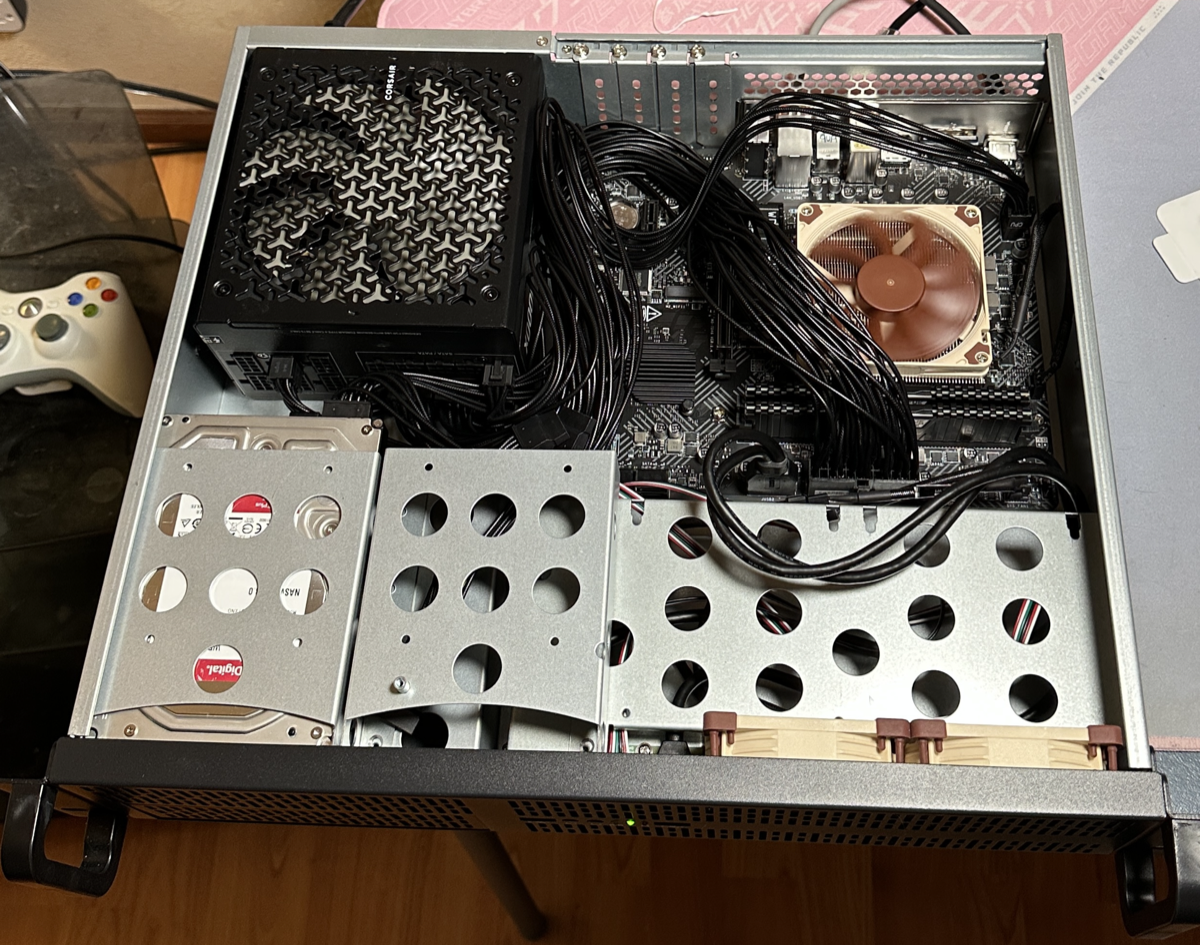
It’s… well, about half new parts and half parts that I scavenged from other systems.  It’s got an i5-12400 that used to be the guts of my gaming PC, an 8TB HDD that got pulled out of my NAS the last time I upgraded it, a 1TB SSD that used to be in a PS5, 32GB of extremely cheap RAM, some Noctua fans because I broke the stock Intel CPU cooler while installing it and then decided that I would replace the case fans while I was ordering a new CPU cooler, and a 1000 watt Corsair power supply that is the definition of overkill but also the only power supply I had on hand.

Oh, and a brand new modern mini ITX board that supports Intel 12th through 14th gen processors but has honest-to-god VGA and PS/2-style connectors on the back panel.  I don’t know if I’ll ever need them but I figured some legacy connectors wouldn’t be awful to have in a server.

All of this is in a cheap Rosewill 2U server case because I am going to rack mount this bad boy.  It will not live on this card table for much longer.

(In three months, it will still be on the card table.  Bet.)

It was not the world’s easiest case to work in, mostly because the cables for this power supply are far too long and Corsair does not sell shorter ones, but I eventually got everything jammed together.  There are some stability issues if I turn on memory overclocking, but otherwise it’s been up and running for the best part of the last two weeks.

Hardware is the easy part, though.  I needed some software to pull it all together and to look good on a resume.  So here’s what I have going on so far:

On the bare metal, I’m running Proxmox.  This seemed like the best option for a hypervisor.  I didn’t want to go anywhere near ESXi right now, and while I have plenty of Windows licenses lying around I didn’t want to deal with Hyper-V either.

Next, there are two Linux VMs.  One is running Ubuntu and the other Rocky Linux.  If I were a proper nerd, one would be Arch.

I don’t hate myself that much. Apologies to Arch fans, and may your fursuits be ever well-ventilated and free of parasites.

After the Linux VMs, I have an Unraid VM.  That’s probably just another Linux VM, really, but it’s Linux with a more user-friendly exterior and a licensing fee – and also with a requirement to boot off a USB drive, because reasons.  Fortunately, Proxmox let me pass through a USB drive so I didn’t have to dedicate hardware to it.

I also told Proxmox to pass through the on-board SATA controller to Unraid.  So, from the Unraid server’s perspective, it has a 128GB “cache” drive (this is a virtual disk) and an 8TB “array” drive (this is a physical disk).

Yes, I know.  I should have a redundant drive in there.  It may happen.

On Unraid, I’m running Docker for apps.  So far I just have Jellyfin running there, mostly as a test.  I can’t move my entire media library over to it, because I have a great deal of media that I’ve bought from iTunes and no media server except Apple’s own can play those files.

It’s just serving a few TB of anime right now, and seems to be working OK.

I have more to do.  Like, I should figure out some stuff to run that isn’t just a media server.  But, for now, I have a valid answer to “describe your home lab for me.”


Posted in organization, work | Leave a comment