
Not many homelab posts recently because I started a new job and it was really pretty rough for a bit there. I’m starting to feel like I’m getting my footing, but the first three months had me kinda regretting rejoining the work force. I’d get off work and just be like, I don’t want to do anything that involves learning.
But I’m feeling a little better now AND I repurposed an older Dell gaming laptop into a machine I could dedicate to homelab stuff by installing Omarchy on it. And I have been taking this to coffee shops just waiting to have my “I use arch, btw” moment but it has not arrived yet.
But what I have done is solved a problem that has been bugging me for some time and that turned out to be embarrassingly simple. Thought I’d share!
See, I have an unraid server that is intended to be a test server and not for production use, but I made the mistake of actually setting something useful up on it in the form of a Suwayomi instance, and now my wife uses it to keep track of all the manga/manhwa/manhua she reads on a daily basis.
I want to move this to a more stable server so I can’t accidentally break it, and in theory docker should make that easy, right? I already have the appdata directory pointed to a volume outside of the container’s virtual disk, I just need to move that over to the new server, spin up a new instance and boom it should just work right? The Suwayomi team even has a pre-baked docker-compose.yml file for you to use for this.
Well, I did that, and I confirmed that I could spin up an instance of Suwayomi and log into it and everything, and then I pointed it at the appdata folder I’d copied over from Unraid and well..
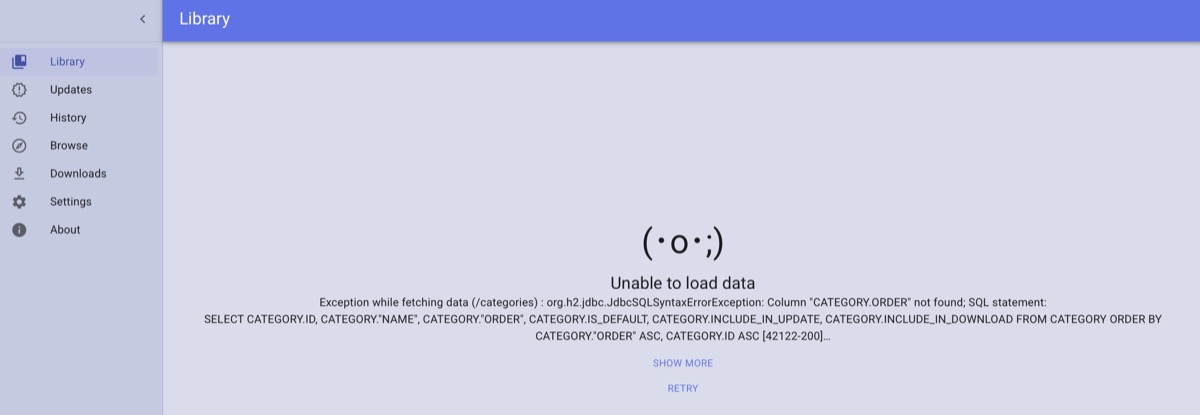
It did not go well.
So naturally I was like, is it permissions? Let’s see what happens if we run as root. OK, no, it’s not that. But it’s obviously a DB error. What DB does Suwayomi use even? How do I find that out?
It wasn’t the solution, but it turns out that Suwayomi uses a DB engine called “H2” which is literally a DB engine written in java that is designed to be embedded in your application so you don’t need to have an external DB server. I did not know this existed before today, but it seems pretty brilliant.
Anyway, I got stuck in a loop for a while. I’d point Suwayomi at the appdata from unraid, and it would break, and I’d point it back at the appdata created by Suwayomi if I just let it run and it would work again.
Eventually… EVENTUALLY I decided to log into unraid and see if I could figure out how it configures its docker images. I already knew it doesn’t use docker-compose files, but I didn’t know what it used.
Turns out they’re xml templates in /root/.docker/templates-user, as an aside.
And I opened the one called my-Tachidesk-Docker.xml and found this:

and then looked at my docker-compose.yml and saw

and swore a bit and changed it to:

…and then pointed the appdata folder for Suwayomi back to the folder from unraid. And it worked. Like, I’m not crazy enough to say it’s working flawlessly, but it seems to work and while I still need to test it a bit more I think it may have solved the problem. It just took several hours of not understanding what was broken, followed by adding seven letters to my docker-compose.yml to fix it entirely.
Also I’m not entirely clear on what the difference is between tachidesk and suwayomi-server. Until I looked at the screenshots just now I did not realize I was literally pulling from different repositories.
I’m also still a little confused as to why the unraid Docker image uses the “preview” build of Suwayomi instead of the latest release build. Personally that seems risky? But I am very risk-averse so maybe I’m just being a stick in the mud here.
Anyway, after I confirm this worked for Suwayomi I’m going to see what other containers I can migrate to their new stable home. Probably lose a little more of my sanity in the process. Should be a fun time.
 Baud Attitude